Mastering the Elegant Feather SVG Collection for Professional Design Results
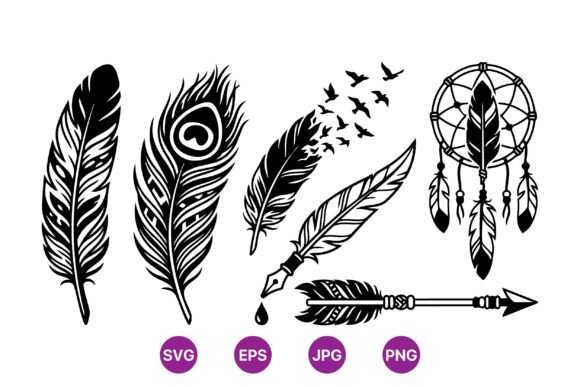
When integrating vector graphics into your creative workflow, the difference between a polished final product and a pixelated disappointment often comes down to file quality and versatility. The Elegant Feather SVG Collection addresses this need by providing a monochrome vector design set that features detailed feathers in various styles. This includes intricate elements such as a peacock feather, a feather transforming into flying birds, an arrow with feather fletching, and a feather dream catcher adorned with beads and strings. These designs showcase tribal and decorative motifs rendered in pure black and white, ensuring high-contrast visibility and sharp results at any scale.
However, many creators, from beginners to seasoned professionals, overlook critical details when selecting and implementing such assets. Understanding how to properly evaluate and utilize these files can save significant time and prevent costly revisions. This guide explores common pitfalls associated with using vector feather collections and offers practical advice on maximizing their potential for your projects.
Misunderstanding Vector Scalability and File Formats
One of the most frequent mistakes designers make is assuming all digital image files behave the same way. A common misconception is that a high-resolution PNG or JPG is sufficient for all applications. While the download package for this collection includes PNG and JPG files for quick previews or web use, relying on them for large-format printing or scalable web elements is a strategic error. Raster images lose clarity when enlarged, leading to jagged edges and blurred details.
The true value of the Elegant Feather SVG Collection lies in its SVG and EPS formats. These are 100% vector files, meaning they are defined by mathematical paths rather than pixels. This allows you to resize a tiny feather icon for a business card or expand it to cover a billboard without any loss in quality. If you ignore these vector formats, you limit the usability of your purchase and may find yourself unable to meet client specifications for large-scale outputs. Always prioritize the SVG or EPS files for any project where resizing is a possibility.
Overlooking the Importance of Path Complexity
Detailed designs, such as the feather turning into flying birds or the dream catcher with beads and strings, contain numerous anchor points and paths. A common oversight among beginners is failing to check the complexity of these vectors before importing them into cutting machines or web platforms. Highly complex vectors can cause performance issues in browser rendering or overwhelm certain vinyl cutters, leading to failed cuts or slow load times.
To avoid this, inspect the file structure before finalizing your design. If you are using the artwork for web purposes, consider simplifying the paths if the platform allows, or ensure your hosting environment can handle the data load. For physical production, such as vinyl decals or laser engraving, test a small section first. The high-contrast black and white nature of these designs is ideal for clarity, but the intricate tribal motifs require precise machine settings. Adjusting your cutter’s speed and pressure according to the density of the feather details will ensure clean edges and prevent material waste.
Neglecting Color Versatility and Layer Management
Because the artwork is presented in pure black and white, some users mistakenly believe they are stuck with this color scheme. This is a significant misunderstanding of vector editing capabilities. The monochrome presentation is a starting point, not a limitation. Each element in the Elegant Feather SVG Collection, from the peacock feather to the arrow, consists of separate layers or groups that can be easily recolored.
Failing to ungroup or release compound paths before attempting to change colors can lead to frustration and inconsistent results. For instance, if you wish to highlight the beads on the dream catcher in gold while keeping the feathers in silver, you must ensure each component is independently selectable. Take the time to explore the layer panel in your design software. By properly managing layers, you can adapt these tribal motifs to fit any brand palette or seasonal theme, greatly extending the utility of the collection. This flexibility is crucial for entrepreneurs and marketers who need to maintain brand consistency across various materials.
Ignoring Licensing and Usage Rights
A critical yet often overlooked aspect of downloading digital assets is understanding the license terms. Many hobbyists and small business owners assume that purchasing a ZIP folder grants them unlimited rights to resell the raw files. This is rarely the case. Typically, licenses allow for the use of the artwork in end products, such as printed t-shirts, mugs, or digital invitations, but prohibit the redistribution of the original SVG or EPS files.
Violating these terms can lead to legal issues and damage your professional reputation. Before using the Elegant Feather SVG Collection for commercial purposes, review the included license agreement. If you plan to sell physical items featuring these designs, ensure your usage aligns with the permitted commercial rights. For educators and freelancers, clarifying these boundaries early prevents misunderstandings with clients and protects your business integrity. Always keep a record of your purchase and license terms for future reference.
Best Practices for Integration and Workflow
To get the most out of this collection, adopt a structured workflow. Start by organizing your downloaded ZIP folder immediately. Extract the SVG, PNG, JPG, and EPS files into clearly labeled directories. This simple step saves time when searching for specific assets during tight deadlines. When working with the feather turning into flying birds motif, consider the narrative flow of your design. Use the directional movement of the birds to guide the viewer’s eye across the page, enhancing the overall composition.
For those using these designs in digital marketing, leverage the high-contrast nature of the black and white artwork. These images stand out well against colored backgrounds, making them ideal for social media graphics or email headers. However, ensure there is sufficient padding around the intricate details of the dream catcher or peacock feather to prevent visual clutter. White space is your ally in maintaining elegance and readability.
- Check file compatibility: Ensure your software supports SVG and EPS formats before starting.
- Test cuts and prints: Always run a small test when using intricate vectors for physical products.
- Customize colors: Ungroup elements to apply brand-specific colors effectively.
- Respect licensing: Use the files for end products only, not for resale as raw assets.
In conclusion, the Elegant Feather SVG Collection offers a versatile and high-quality resource for a wide range of creative projects. By avoiding common mistakes related to file formats, path complexity, color management, and licensing, you can ensure professional results every time. Whether you are a blogger looking for unique header images or a small business owner creating branded merchandise, taking the time to understand these technical details will enhance your efficiency and satisfaction. Embrace the precision of vector graphics and let these detailed feather motifs elevate your design work.